

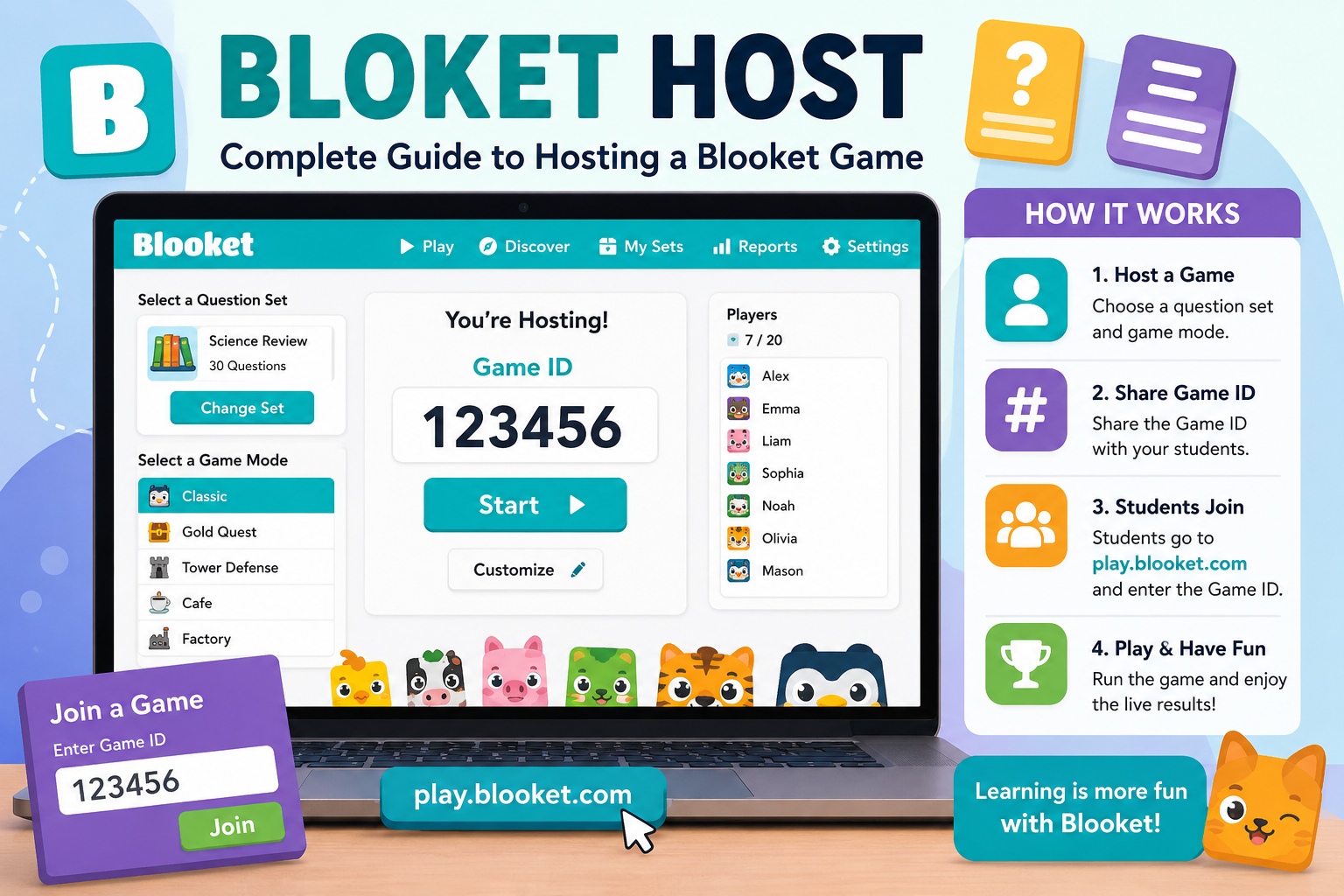
If you searched for Bloket Host, you are probably looking for information about how to host a Blooket game. The spelling is commonly written as “Bloket,” but the platform itself is called Blooket. It is a game-based learning platform where a host selects a question set and game mode, while players join from their own devices. Blooket describes its basic process as selecting a question set, choosing a game mode, playing, and reviewing results afterward.
Hosting a game is relatively straightforward, but there are several details that can make the difference between a smooth classroom session and a frustrating one. This guide explains what a Blooket host does, how hosting works, how players join, how to choose a suitable game mode, what to check before starting, and which common problems to avoid.
What Is Bloket Host?
Bloket Host generally refers to the person using Blooket’s hosting function to run a live game.
In a typical Blooket session:
- The host chooses a question set.
- The host selects an available game mode.
- Blooket creates a game session.
- Players join using the provided game code.
- The host starts the game.
- Players answer questions on their own devices.
- The host can review the results after the session.
Blooket’s official site describes the platform as allowing one player or teacher to host while other participants compete using their own devices.
The term “Bloket Host” is therefore not a separate platform. It is usually a misspelling or shortened search term for hosting a game on Blooket.
How Blooket Hosting Works
The hosting system separates the experience into two sides: the host and the players.
| Host | Players |
|---|---|
| Selects a question set | Join the game |
| Chooses a game mode | Answer questions |
| Starts the session | Participate in the selected mode |
| Manages the game | See their own gameplay |
| Reviews results | Receive gameplay outcomes |
| Controls the classroom activity | Compete or learn |
This structure means players generally do not need to control the game setup themselves.
Blooket’s privacy policy also explains that invited visitors can participate using a username, while registered users have additional account functionality.
How to Host a Blooket Game
Step 1: Open Blooket
Start by visiting the official Blooket website.
If you are hosting regularly as a teacher, using your own account makes it easier to manage question sets and review available features.
Blooket also provides a dedicated game-playing page for participants who need to join an existing session.
Step 2: Choose a Question Set
A Blooket game needs questions. You can generally select an existing question set or create your own.
Blooket specifically highlights two options: finding a question set from its library or creating your own.
When selecting a set, consider:
- The students’ age
- The subject
- Difficulty level
- Number of questions
- Whether the questions match your lesson
- Whether the wording is clear
- Whether the answers are accurate
A popular question set is not necessarily the best question set for your class.
Step 3: Select a Game Mode
After choosing the questions, select a game mode.
This is one of the most important parts of hosting because different modes can create very different classroom experiences.
Blooket currently presents multiple game modes, and the options available can change. Its gameplay pages, for example, show modes such as Fishing Frenzy, Pirate Pool, Tower Defense, Café, Factory, Study, and others.
Don’t choose a mode simply because its name sounds entertaining. Think about what you want students to accomplish.
For example:
- Review session: choose a mode that keeps questions moving at a reasonable pace.
- Short activity: use a mode suited to a brief session.
- Practice: prioritize repeated exposure to questions.
- Competitive activity: choose a mode where competition adds value rather than distracting from the lesson.
Step 4: Start the Game Session
Once the question set and game mode are selected, Blooket creates the game session.
The host then receives information that players can use to join.
This is where the host should pause briefly rather than immediately starting the game.
Check that:
- The correct question set is selected.
- The intended game mode is displayed.
- The number of expected players is reasonable.
- Students can access the joining page.
- Everyone understands what username they should use.
A short preparation period can prevent many problems later.
Step 5: Share the Game Code
Players need the game’s joining information.
Blooket uses a game code for players joining a hosted session. Its terms specifically refer to a “Game Code” created when an account holder initiates a game.
Give students the code through whatever method is appropriate for your classroom, such as:
- Displaying it on a classroom screen
- Writing it on a board
- Sharing it through an approved classroom platform
- Saying it aloud
Students then enter the game code on Blooket’s join page.
Important distinction: Game Code vs. Account
A player joining a hosted game does not necessarily need a full Blooket account.
Blooket’s privacy policy says visitors invited to play can participate by choosing a username, while its terms explain that students can access a game using the game code without creating an account in the relevant circumstances.
That makes live classroom participation simpler.
Step 6: Wait for Players to Join
Before starting the game, check the player list.
This is a useful opportunity to catch problems such as:
- A student using the wrong code
- A student accidentally joining another session
- A duplicate username
- An inappropriate username
- A student who cannot connect
If the activity involves younger students, it is especially useful to establish a simple username rule beforehand.
For example, students could use their first name and an assigned number rather than entering unnecessary personal information.
Step 7: Start the Blooket Game
Once the expected participants are present, start the game.
Players will then participate using their individual devices while the host manages the session.
The host should avoid spending the entire activity watching the scoreboard. The educational objective should remain the priority.
Blooket’s own description emphasizes the combination of playing, learning, and analyzing results rather than treating the game purely as entertainment.
Choosing the Right Blooket Game Mode
The game mode affects the experience almost as much as the questions themselves.
A useful way to choose is to match the mode to the learning objective.
| Goal | What to prioritize | Why |
|---|---|---|
| Quick review | Fast question flow | Keeps the session moving |
| Lesson practice | Question repetition | Gives students more exposure |
| Competitive review | Competition and strategy | Adds motivation |
| Independent practice | Flexible gameplay | Students can work at their own pace |
| Short classroom activity | Simple setup | Less time is lost explaining rules |
| Post-test review | Accuracy and feedback | Focus stays on misconceptions |
Blooket also supports asynchronous activities such as homework, where the gameplay experience can be assigned rather than conducted as a simultaneous live session.
Live Hosting vs. Blooket Homework
One frequently overlooked distinction is the difference between a live hosted game and an asynchronous activity.
Live Game
A live game is useful when the teacher wants the class to participate at roughly the same time.
It works well for:
- Classroom review
- Warm-up activities
- Group competitions
- End-of-lesson activities
- Exam preparation
Homework
Homework allows students to complete an assigned activity separately.
Blooket’s homework interface lets an assigner select gameplay options and provides players with an activity they can complete outside a simultaneous classroom session.
The choice should depend on the lesson rather than simply using the same format every time.
How Students Join a Blooket Host Game
The student process is simpler than the host process.
Generally, a player:
- Opens Blooket’s game-joining page.
- Enters the game code.
- Provides the requested username.
- Waits for the host to begin.
- Answers questions during the game.
Blooket’s play page currently provides a Game ID field for joining a game.
Students should be told to use the official Blooket site rather than clicking random third-party links claiming to provide game codes or hacks.
What Makes a Good Blooket Question Set?
Hosting isn’t only about starting the game. The quality of the question set has a major effect on the learning outcome.
Keep Questions Focused
Each question should test a specific concept whenever possible.
Poor question:
Which of these is related to science?
Better question:
Which organelle is primarily responsible for producing ATP in eukaryotic cells?
The second question gives students a clear target.
Avoid Ambiguous Answers
If two answers could reasonably be considered correct, students may become frustrated even when they understand the topic.
Review your questions before using them with a class.
Use Appropriate Difficulty
A game containing only extremely easy questions may create excitement but provide little diagnostic information.
A game containing only difficult questions can have the opposite problem.
A better question set usually contains a mixture of straightforward recall, application, and appropriately challenging questions.
Why Blooket Can Be Useful for Learning
Blooket combines question-and-answer activities with game mechanics.
Its official website highlights features such as instant feedback and reports that can help educators identify knowledge gaps after gameplay.
Potential educational uses include:
- Reviewing previously taught material
- Checking understanding
- Increasing participation
- Practicing terminology
- Reinforcing factual knowledge
- Identifying areas that need additional explanation
The key is how the teacher uses the results afterward.
A game should not automatically be treated as proof that students have mastered a topic.
The Most Overlooked Part: What Happens After the Game?
Many hosts focus heavily on the game itself and overlook the results.
That can reduce the educational value of the activity.
After the session, look for patterns.
For example, suppose most students miss the same question. That may indicate:
- The concept was not taught clearly.
- The question was poorly written.
- The answer choices were confusing.
- Students misunderstood the terminology.
- The underlying topic needs another explanation.
Blooket says its platform provides reports and performance information after games.
The report becomes more useful when you treat it as a diagnostic tool rather than simply a ranking system.
Common Blooket Hosting Problems
Students Cannot Join
Check the basics first:
- Verify the game code.
- Make sure students are using the correct Blooket joining page.
- Check their internet connection.
- Confirm that the game is still open.
- Make sure the host has not accidentally ended the session.
The Game Feels Too Slow
This can happen when the selected mode or question set does not match the class.
Try:
- Shortening the question set
- Removing unnecessary questions
- Selecting a more suitable game mode
- Testing the activity before class
Students Focus Too Much on Competition
Competition can increase engagement, but it can also become a distraction.
If students care only about winning, they may rush through questions or guess rather than think.
A useful solution is to discuss the questions afterward and reward accurate reasoning, not just the final leaderboard position.
Some Students Finish Much Faster
Different students work at different speeds.
This is one reason not to interpret a game score too literally.
Fast completion does not always mean deeper understanding.
Privacy and Safety Considerations
Blooket’s current privacy policy states that visitors participating in games generally provide a username of their choice, while the platform collects gameplay responses.
For classroom use, avoid asking students to enter unnecessary personal information.
Teachers should also follow their school’s policies concerning:
- Student accounts
- Personal information
- Acceptable usernames
- Device use
- Online classroom platforms
- Data protection
Blooket states that it aims to collect minimal information from students and describes additional protections concerning children and student users.
Blooket Host and Account Requirements
Another common misunderstanding is that every player needs the same account setup as the host.
That is not necessarily the case.
Blooket’s terms distinguish between account holders and students or visitors invited to participate. Students can, in the applicable circumstances, join using a game code without creating an account.
The host, however, needs access to the hosting functionality associated with the account.
Blooket also offers free and paid subscription options, and features can differ depending on the plan. Its current terms state that Blooket Plus subscriptions may provide additional features and that plans can change over time.
For that reason, avoid relying on old tutorials that claim every historical feature is still available under the same plan.
Free vs. Paid Blooket Hosting
Blooket offers free access as well as paid Blooket Plus plans.
The exact limits and features can change, so the best approach is to check Blooket’s current plan information before planning a large classroom activity.
For many basic activities, the important question isn’t simply “Is Blooket free?”
Instead ask:
Does the plan I have support the specific activity I want to run?
That distinction matters because a teacher may plan around a particular feature and discover that it requires a different subscription.
Common Mistakes to Avoid When Hosting
1. Choosing a Mode Without Testing It
A game mode may look perfect but behave differently from what you expected.
Test unfamiliar modes before using them with an entire class.
2. Using Too Many Questions
Longer isn’t always better.
If the objective is a 10-minute review, a massive question set can turn a quick activity into a lengthy session.
3. Ignoring Question Quality
Game mechanics cannot fix inaccurate or confusing questions.
Always review the set before using it.
4. Sharing Unnecessary Student Information
Students generally need very little information to participate as visitors.
Keep usernames simple and avoid collecting unnecessary personal details.
5. Treating the Leaderboard as the Assessment
A leaderboard measures performance within a particular game.
It should not automatically be treated as a formal assessment of student knowledge.
A Simple Blooket Host Checklist
Before class:
- Choose the question set.
- Review the questions.
- Select an appropriate game mode.
- Test the activity if the mode is unfamiliar.
- Check your internet connection.
- Prepare the game code.
- Decide what username rules students should follow.
During class:
- Display or share the game code.
- Wait for expected players.
- Check usernames.
- Explain the basic rules.
- Start the game.
- Monitor participation.
After class:
- Review the results.
- Identify commonly missed questions.
- Re-teach important misconceptions.
- Save or reuse an improved question set when appropriate.
Lesser-Known Details About Blooket Hosting
One useful distinction is that hosting and playing are different roles. The host controls the session, while participants use their own devices to respond. Blooket explicitly describes this host-versus-player structure in its privacy documentation.
Another detail is that Blooket is not limited to simultaneous classroom games. Its current platform also supports asynchronous homework-style activities, giving educators another way to use the same general question-and-game concept.
Finally, the platform’s terms prohibit unauthorized cheats, bots, hacks, and other methods intended to manipulate gameplay. This matters because websites offering “Blooket hacks” or automated advantages are not legitimate alternatives to normal hosting.
Is Blooket Good for Classroom Review?
Blooket can be effective for classroom review when the questions are well designed and the game mechanics support the learning objective.
Its strongest use is usually as part of a larger lesson:
Teach → Practice → Play → Review results → Address misconceptions
That approach is more useful than treating the game as the entire lesson.
The platform itself emphasizes the connection between playing, learning, and analyzing performance.
Frequently Asked Questions
What is Bloket Host?
“Bloket Host” is generally a misspelling of Blooket Host. It refers to the person who creates and manages a Blooket game session. The host selects the question set and game mode, starts the session, and provides players with the information needed to join.
How do I host a Blooket game?
Open Blooket, choose a question set, select a suitable game mode, create the game session, and share the resulting game code with participants. Players can then join through Blooket’s game-joining page.
Do students need a Blooket account to join?
Not necessarily. Blooket’s terms and privacy policy explain that invited students or visitors can participate in a game using a game code and may only need to provide a username, depending on the circumstances.
Is Blooket free to host?
Blooket provides free access as well as paid Blooket Plus plans. Available features and limits can vary by subscription, so hosts should check the current plan details when they need a particular feature.
Can Blooket be used for homework?
Yes. Blooket supports asynchronous homework-style activities in addition to live games. The homework interface allows an assigned activity to use selected game modes without requiring all students to participate simultaneously.
What should I do if students cannot join my Blooket game?
First verify the game code and ensure students are using the official Blooket joining page. Then check internet connectivity and confirm that the host session is still active. If the problem continues, testing the session from another device can help determine whether the issue is local or session-related.
Can I create my own Blooket questions?
Yes. Blooket states that users can find question sets from its library or create their own. Creating your own set can be particularly useful when the questions need to match a specific lesson, textbook, quiz, or curriculum objective.
Conclusion
Bloket Host is best understood as the Blooket hosting process rather than a separate website or service. A host chooses a question set, selects a game mode, creates a session, shares the game code, manages participation, and reviews the results afterward.
The most effective approach is to focus on the educational purpose first and the game mechanics second. Choose questions carefully, use an appropriate mode, protect student privacy, and use post-game results to identify concepts that need more practice. Blooket can then serve as a useful review and engagement tool rather than simply a competitive classroom game.