

Looking for the official Eoperasi login portal to update your teacher profile? Access the database directly at eoperasi.moe.gov.my to complete your mandatory data verification.
The official Eoperasi login portal is the primary digital gateway for Malaysian Ministry of Education (KPM) teachers to manage professional data. This guide breaks down everything you need to know about the system to keep your profile flawless.
Modern education systems rely heavily on precise personnel tracking. It just works when the data is clean and updated.
1. What is Eoperasi?
Essentially, Eoperasi serves as the central node of the School Management System (SPS). Developed by the Bahagian Pengurusan Maklumat (BPM), this application streamlines the administrative load of teachers across Malaysia.
It acts as a single source of truth for both teaching and non-teaching staff. Instead of manual paperwork, the system digitizes service records, subjects taught, and school allocations.
The primary goal is to ensure the Ministry of Education has a real-time overview of the teaching workforce. This database directly influences nationwide staffing budgets and teacher transfers.
2. Access Tiers: Who Can Log In?
Not every educator can register for Eoperasi without initial system integration. The system categorizes users into distinct tiers to maintain data security.
Administrators have broad access privileges. They verify data submissions and manage institutional profiles.
-
System Administrators: Personnel at the Ministry, State (JPN), and District (PPD) levels. They oversee system health and approve macro-level adjustments.
-
School Administrators (Pentadbir Sekolah): This group includes the Headmaster (Pengetua/Guru Besar) and Senior Assistants (Penolong Kanan PK1, PK2, PK3). They hold the authority to edit or correct locked staff profiles.
-
Standard Users (Guru & Staf Sokongan): Individual teachers and support staff who must regularly verify their personal profiles.
Your login access is tied directly to your official identification card number. Sharing accounts is strictly forbidden.
3. Step-by-Step Eoperasi Login Guide
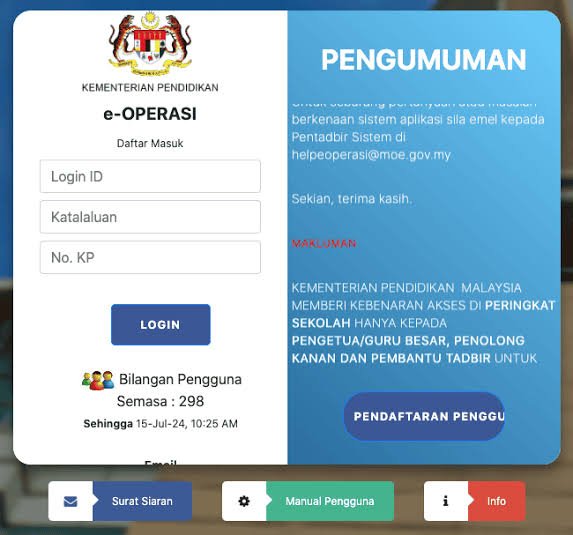
Before accessing the system, ensure you have verified your login credentials on the official Eoperasi registration page. Follow these exact steps to access your dashboard safely.
Logging in successfully requires a perfect match across all three input fields. One single typo will trigger a validation error.
4. Key Functions & Data Management Modules
The core utility of Eoperasi lies in its specialized management modules. Each module serves a highly specific administrative function.
Teachers must understand these modules to ensure their service histories remain accurate. The table below outlines the primary modules available within the portal.
Main Modules Within the Portal
Keeping these records updated prevents administrative friction. It is especially critical when applying for school transfers.
The BSKG module is particularly important for school heads. It calculates whether a school has too many or too few teachers for a specific subject.
5. Troubleshooting: Password Reset and Account Lockouts
Account lockouts on Eoperasi usually happen when a user enters the wrong password three times. Fortunately, the system offers an automated recovery path.
To reset your password, click the “Lupa Kata Laluan” link on the login page. You will need to provide your registered Identity Card number.
The system then prompts you to answer your pre-configured security question. Common security questions include:
-
What is your childhood hero’s name?
-
What is your favorite sport?
-
What is your mother’s name?
Once answered correctly, a reset link is sent to your registered email address. If you still cannot access your account, you must contact your school’s PK1 administrator.
School administrators have the tools to manually override accounts and issue temporary passwords. Never share your temporary credentials with anyone.
6. System Integrations within KPM
Many educators confuse Eoperasi with idMe, the newer integrated identity system. While they appear similar, they serve entirely different purposes.
The idMe system acts as a centralized single-sign-on portal for various KPM services. In contrast, our target platform remains dedicated to deep operational backend data for teachers.
Other systems work hand-in-hand with this database:
-
APDM (Aplikasi Pangkalan Data Murid): Manages student demographics and daily attendance.
-
ePangkat: Focuses on teacher promotions and career path progression.
-
HRMIS: The overarching civil service human resource management platform.
Data flows seamlessly between these applications. Ensuring your profile is accurate on one system ensures smooth updates across the others.
Expert Verdict
Regular data verification on Eoperasi is your best protection against administrative delays in promotions. Treat this portal as your personal career ledger.
We highly recommend logging in at least once a month to audit your records. Do not wait for transfer season to discover a spelling mistake in your profile.
Take ownership of your professional digital identity. It is easy, efficient, and vital for your career growth.
Frequently Asked Questions (FAQs)
How do I register for a new Eoperasi account?
First, visit the official registration page at eoperasi.moe.gov.my. Complete the form with your full name, IC number, salary number, and valid email.
Your account must be pre-approved by your school’s system administrator before you can log in. Once approved, you can complete the registration and set up your security credentials.
What should I do if my data in Eoperasi is incorrect?
Certain fields can be edited directly by the teacher, but core fields remain locked for security. If you find errors in your service history or salary grade, notify your Penolong Kanan 1 (PK1) immediately.
They will verify your supporting documents and update the system on your behalf. Keep copies of your official appointment letters handy for proof.
Why is my Eoperasi login ID locked?
Your account is locked automatically after entering incorrect credentials multiple times to prevent unauthorized access. This is a standard security protocol to protect sensitive civil servant data.
You can use the self-service “Lupa Kata Laluan” tool or ask your school administrator to reset your account. The reset process takes less than five minutes when coordinated with school staff.
What is the difference between Eoperasi and idMe?
The idMe portal is an identity management system designed for unified access across multiple apps. Meanwhile, Eoperasi remains a highly specialized backend database specifically for school staff operational planning.
While idMe aims to unify logins, certain deep management tasks still require you to access the dedicated portals. Both systems require separate attention to keep your records consistent.
Can non-teaching staff (AKP) use the system?
Yes, support staff (Anggota Kumpulan Pelaksana) are fully registered in the database. Their operational data is vital for school administration and budgeting.
They must follow the exact same login and verification procedures as teachers. Keeping their files updated ensures they are accurately included in the school’s resource allocation calculations.