

Miniproxy Unblocked usually refers to using a miniProxy-based web proxy to reach websites that are restricted by a local network, content filter, firewall, or geographic rule. The term can be confusing because miniProxy is not itself a special “unblocked” edition. The original miniProxy project is an open-source PHP web proxy designed to relay web requests through another server. Its official project page describes it as a simple PHP web proxy that can be used to bypass internet content filters or browse through a proxy.
That distinction matters when evaluating websites that advertise “Miniproxy Unblocked.” A public website using the miniProxy name may be an independently hosted copy, a modified deployment, or simply a site using the term for search visibility. It should not automatically be treated as the official project.
This guide explains what miniProxy actually is, what “unblocked” means, how proxying works, where miniProxy has limitations, and what users should consider before relying on an unknown public proxy.
What Is Miniproxy?
miniProxy is a lightweight PHP web proxy created by Joshua Dick. The original project is open source under the GNU GPL v3 license. Its official documentation says that it can run on a web server with PHP and the required cURL extension.
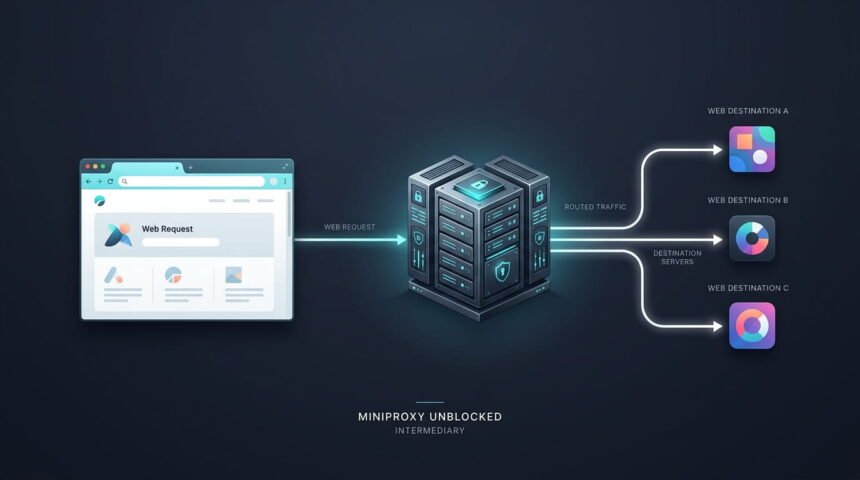
Unlike a conventional VPN application, miniProxy is primarily a web-based proxy script. Instead of connecting directly from your browser to a destination website, the proxy server acts as an intermediary.
The basic concept looks like this:
Your browser → miniProxy server → destination website
The destination website receives the proxy server’s request rather than a direct connection from your browser.
The original project was deliberately simple. The official documentation says installation can involve copying miniProxy.php to a PHP-enabled web server and accessing the file directly.
What Does “Miniproxy Unblocked” Mean?
The word unblocked is generally a description rather than an official product name.
When someone searches for Miniproxy Unblocked, they may be looking for:
- A proxy that works on a restricted network
- A way to access websites blocked by a school or workplace filter
- A browser-based proxy that does not require a separate application
- A miniProxy deployment that can relay requests through another server
- Information about bypassing regional or network restrictions
Search results also show websites using “miniproxy unblocked” as a generic phrase for proxy access.
However, unblocked does not mean unrestricted or guaranteed to work everywhere. A network administrator can block proxy domains, IP addresses, proxy traffic, or particular destinations.
How Does Miniproxy Work?
A proxy works by placing an intermediary between the client and the destination.
Suppose you want to request a webpage directly:
Browser → Website
With a web proxy, the process becomes:
Browser → Proxy → Website
The proxy receives your request, retrieves content from the destination, and sends the response back through the proxy.
miniProxy was designed around this basic model. Its documentation describes it as a PHP web proxy and provides options for controlling which URLs can be proxied.
This can change how a website sees the connection. Depending on the proxy’s configuration, the destination may see information associated with the proxy rather than the user’s direct connection.
That does not, however, make the user completely anonymous.
Why Do People Search for Miniproxy Unblocked?
The search term is strongly associated with restricted browsing.
School and Workplace Networks
Schools and workplaces sometimes use network filtering to restrict categories of websites. A proxy can potentially provide an alternative route to a destination.
But bypassing an organization’s controls can violate its acceptable-use policy.
Users should not view a proxy as a way to ignore network rules. If an administrator intentionally blocks a website, users should first determine whether a legitimate reason exists for the restriction.
Regional Restrictions
Websites can restrict content according to geographic location. A proxy located somewhere else may make a request appear to originate from another network.
This can sometimes affect what content is returned, but it is not guaranteed.
Content providers can use additional methods to determine location, including account information, cookies, browser signals, and other technical mechanisms.
Testing Web Applications
Developers can also use proxy technology for legitimate testing.
A self-hosted proxy can help developers understand:
- HTTP requests
- Response headers
- URL rewriting
- Web application behavior
- Network routing
- Content filtering
- Proxy configuration
For development purposes, self-hosting is generally more controllable than using an unknown public proxy.
Is Miniproxy the Same as a VPN?
No.
Although both technologies can act as intermediaries, a traditional web proxy and a VPN operate differently.
| Feature | miniProxy / Web Proxy | VPN |
|---|---|---|
| Primary purpose | Relay web requests | Route device/network traffic through a VPN tunnel |
| Typical implementation | Web application | VPN client/server infrastructure |
| Coverage | Often browser/web traffic | Can cover broader device traffic |
| Installation | PHP web server for self-hosting | VPN software or OS configuration |
| Encryption | Depends on the connection and implementation | VPN tunnel normally encrypts traffic between client and VPN server |
| Configuration | Web-proxy specific | VPN/network specific |
| Best suited to | Web requests and development | Broader network privacy and remote access |
Calling every proxy a VPN can create unrealistic expectations.
A web proxy should not automatically be considered a complete privacy solution.
Is Miniproxy Unblocked Safe?
The answer depends heavily on which miniProxy deployment you are using.
The original miniProxy project is open source, but that does not mean every public website using the name is trustworthy.
This is one of the most important distinctions surrounding Miniproxy Unblocked.
A self-hosted copy gives the administrator control over the server and configuration. A random public proxy gives the operator control over the intermediary through which your requests pass.
That creates a trust issue.
Why Public Proxies Require Caution
A proxy operator may potentially have visibility into connection metadata and requests passing through the service.
You should therefore avoid entering sensitive information into an unfamiliar proxy.
Particular caution is appropriate for:
- Banking websites
- Payment services
- Email accounts
- Password managers
- Private documents
- Business dashboards
- Medical portals
- Government accounts
Users should not treat a proxy as a trusted security boundary simply because its provider labels it “anonymous” or “secure.”
Does Miniproxy Hide Your IP Address?
A proxy can change which server directly communicates with the destination website.
The original miniProxy source includes an anonymization configuration option. The project’s code documentation explains that the configuration can control whether the client’s IP is exposed to proxied sites through the X-Forwarded-For header.
This is a useful example of why configuration matters.
A proxy can be configured differently by different administrators. Therefore, you cannot assume that every public miniProxy installation provides the same level of IP protection.
Also, hiding an IP address from one destination does not make a person completely anonymous online.
Important Limitations of miniProxy
The original project is deliberately lightweight, and its official documentation lists several limitations.
These include:
<object>tags are not handled- There is no cookie support
- AJAX support is basic and limited to browsers using
XMLHttpRequest
These limitations can affect modern websites.
Many websites now rely heavily on JavaScript, cookies, authentication, client-side applications, APIs, and advanced browser features. A simple web proxy may therefore fail to reproduce the complete experience.
A page loading successfully through a proxy does not mean every part of the website will work.
Why Some Websites Do Not Work Through Miniproxy
There are several possible reasons.
JavaScript Dependencies
Modern websites often depend on JavaScript frameworks and APIs. If the proxy does not correctly rewrite or relay those requests, parts of the site may fail.
Cookies
The original miniProxy documentation specifically lists the lack of cookie support as a limitation.
That can cause problems with websites that rely heavily on sessions.
Authentication
Login systems can behave unpredictably through intermediary services, especially when the proxy does not fully reproduce browser behavior.
HTTPS and Modern Web Security
Modern websites increasingly use security mechanisms that assume direct browser communication. A basic proxy may not handle every situation correctly.
Anti-Proxy Protection
Some websites intentionally detect and restrict known proxy servers or suspicious traffic.
Consequently, Miniproxy Unblocked is not a guaranteed method for reaching every blocked website.
Miniproxy Unblocked vs. a Regular Proxy
The difference is mostly terminology.
| Term | Meaning |
|---|---|
| miniProxy | A specific PHP web-proxy project |
| Miniproxy Unblocked | A search phrase generally referring to using miniProxy or a related deployment to reach restricted content |
| Web proxy | A broader category of intermediary servers |
| VPN | A different networking technology that can route broader traffic |
| Public proxy | A proxy operated by someone else and made available to users |
| Self-hosted proxy | A proxy installed and controlled by the user or organization |
Understanding these distinctions makes it easier to evaluate proxy websites without relying on marketing terminology.
Self-Hosted miniProxy vs. Public Miniproxy
This is one of the most overlooked issues.
The original project was designed to be installed on a web server.
A self-hosted deployment means you control:
- The server
- The domain
- Configuration
- Access policies
- Logs
- Software changes
- Security settings
A public deployment means someone else controls those elements.
| Factor | Self-hosted miniProxy | Public proxy |
|---|---|---|
| Server control | Your responsibility | Third-party operator |
| Configuration | Fully configurable | Usually unknown |
| Privacy trust | Depends on your administration | Depends on operator |
| Availability | Depends on your server | Depends on public service |
| Customization | High | Usually limited |
| Security responsibility | Yours | Shared/uncertain |
| Best use | Development and controlled access | Temporary low-risk browsing |
For anyone interested in the technology rather than simply bypassing a filter, self-hosting offers considerably more visibility into how the system operates.
Is miniProxy Still Maintained?
This is an especially important point in 2026.
GitHub currently marks the project “UNMAINTAINED,” and its topic listing identifies the repository as a simple PHP web proxy that no longer receives maintenance.
The project’s original documentation remains available, but users should distinguish between a project that still has documentation and a project that developers actively maintain.
This matters because web technology and security requirements change over time.
Developers can still use an older proxy script for learning or controlled legacy environments, but they should not automatically treat it as a modern privacy or security solution.
Security Considerations Before Using a Public Proxy
If you encounter a website advertising Miniproxy Unblocked, evaluate it before sending traffic through it.
Check the Domain
The original project does not necessarily affiliate with every domain that uses the miniProxy name.
Avoid Sensitive Logins
Do not enter passwords or financial information into an unfamiliar proxy interface.
Look for HTTPS
HTTPS protects the connection between your browser and the proxy website when correctly configured, but it does not automatically make the proxy operator trustworthy.
Consider the Destination
A proxy is not a permission system. If a destination requires authentication or contains sensitive data, using an unknown intermediary creates additional risk.
Check for Suspicious Downloads
A proxy page that suddenly asks you to install an extension, executable, certificate, or unknown application deserves extra scrutiny.
What Competitors Often Misrepresent About Miniproxy Unblocked
A common weakness in articles about Miniproxy Unblocked is treating the term as if it were the name of a modern, centralized service.
The original miniProxy is an open-source PHP proxy script that developers can deploy on a web server.
Therefore, no single universal “Miniproxy Unblocked” server offers the same features everywhere.
Different installations can have different:
- Domains
- Administrators
- Configurations
- Security policies
- Whitelists
- Server locations
- Availability
- Performance
- Logging practices
This is perhaps the most useful fact to understand before using one.
The name alone tells you very little about the trustworthiness of a particular public proxy.
When a Proxy Is Not the Right Solution
A proxy may be inappropriate when the actual problem is something else.
For example, if a website does not load because of DNS problems, browser corruption, server downtime, or an expired certificate, using a proxy may simply hide the underlying issue.
Similarly, if an organization blocks a website for security reasons, bypassing that restriction may create more risk than solving the original problem.
For legitimate access, consider alternatives such as:
- Asking the network administrator for access
- Using an officially provided mirror
- Accessing the website through an authorized connection
- Using a legitimate VPN service when appropriate
- Contacting the website owner
- Using an approved educational or workplace resource
Frequently Asked Questions
What is Miniproxy Unblocked?
People generally use “Miniproxy Unblocked” to describe using a miniProxy-based web proxy to reach websites that a network or content filter restricts.
The original miniProxy project is an open-source PHP web proxy, rather than a single centralized “unblocked” service.
Is miniProxy a VPN?
No. Developers wrote miniProxy as a web proxy in PHP. A web proxy typically handles web requests through an intermediary server, while a VPN can route broader network traffic through a VPN tunnel. The two technologies can overlap in purpose but are not technically identical.
Is Miniproxy Unblocked safe?
Safety depends on the specific deployment. The original miniProxy project being open source does not make every public website running it trustworthy. A third-party proxy operator controls the intermediary server, so users should avoid sending passwords, financial information, or other sensitive data through unknown proxy sites.
Can Miniproxy bypass school or workplace blocks?
A web proxy can sometimes bypass certain types of network filtering, but it cannot guarantee access.
Schools and workplaces can block proxy domains, IP addresses, categories of traffic, or other indicators. Users should also consider whether bypassing an organization’s network restrictions violates its policies.
Does miniProxy hide your IP address?
A proxy can prevent a destination from receiving a direct connection from the user’s IP, depending on its configuration. The original miniProxy code includes an anonymization setting related to forwarding the client’s IP address. However, this does not provide complete online anonymity.
Does miniProxy work with modern websites?
Not necessarily. The original project’s documentation lists limitations including no cookie support and only basic AJAX support. Modern websites that depend heavily on JavaScript, cookies, APIs, authentication, or advanced browser features may not work correctly through an older proxy implementation.
Is miniProxy still maintained?
The repository owner has marked the original GitHub repository as unmaintained. That does not make the software useless for learning or controlled legacy environments, but it means users should carefully consider its age and security limitations before deploying it publicly.
Conclusion
Miniproxy Unblocked describes proxy-based access to restricted web content rather than a single official, universally available service. Developers created the underlying miniProxy project as a lightweight PHP web proxy that relays web requests, and users can self-host it.
Its simplicity is also its limitation. The original project lacks some capabilities expected by modern websites, and its repository is now marked unmaintained.
If you encounter a public site advertising Miniproxy Unblocked, evaluate the specific site and operator, not just the miniProxy name. For ordinary low-risk browsing, you may find a proxy useful in some situations, but you should not confuse it with a full VPN or treat it as a guarantee of privacy, security, or unrestricted access.