

Introduction
If you are a Malaysian educator, mastering Splkpm is your most important administrative task. It ensures your training records are synchronized directly with the Ministry of Education.
Failing to update your training hours can stall your career progression. This guide simplifies the entire ecosystem so you never miss an annual deadline.
We provide direct, actionable steps based on the latest 2026 guidelines. Let’s make sure your profile stays fully compliant.
How to Access the Splkpm Login Portal Safely
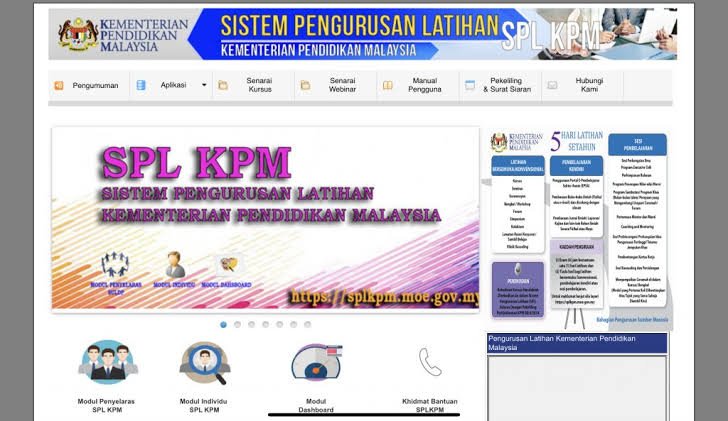
The official gateway for logging your continuous professional development is the online portal. To begin, visit the official site at splkpm.moe.gov.my.
You must select the correct module before typing your credentials. Most teachers will need the individual login route.
Let’s look at the standard interface so you know what to expect.
To log into your Splkpm account, follow the official individual access steps. Make sure your browser is updated to avoid display glitches.
Once logged in, take a moment to verify your personal details. Any discrepancies in your name or school code should be reported immediately.
The system draws its primary user data from the central eOperasi repository. Because of this, any modifications to your teaching station or grade must be updated there first.
Understanding the Splkpm Credit Points System (MyPPB)
The Ministry of Education requires all educators to collect professional development points annually. The benchmark for compliance is achieving at least 42 credit points and 5 training days each year.
Keeping track of your Splkpm credit points is mandatory for career progression. This system is officially known as MyPPB.
Each activity you participate in yields a specific number of points. These points are verified by your school’s LDP Secretary (SULDP) before they appear on your official record.
Different professional activities have varying maximum point limits. Understanding these caps helps you plan your training year effectively.
Planning your activities around these categories ensures balanced professional growth. It also prevents you from hitting individual category caps too early.
These accumulated points are directly linked to your annual performance evaluation score, known as PBPPP. A perfect score in this module secures maximum marks for your professional development metric.
Deep Dive: The 13 MyPPB Professional Development Paths
Let’s analyze the most common ways to secure points. Each path offers a unique way to enrich your pedagogical skills.
1. Kursus and Bengkel (Courses and Workshops)
These are structured training sessions organized by your school, district, or state departments. You can earn up to 15 credit points through this traditional route.
Attendance is compiled by the event secretary and updated automatically for all participants. You do not need to manually input these events.
2. Wacana Ilmu (Academic Discourses)
This path includes short educational talks, briefings, and dialog sessions. It is ideal for quick knowledge sharing during assemblies or brief staff meetings.
A brief attendance report must be filed to validate the session. Ensure your SULDP logs the session within 14 days of the talk.
3. Bimbingan Dan Pementoran (Coaching and Mentoring)
Experienced teachers can act as mentors to guide newly appointed educators. This critical practice awards up to 10 credit points to the designated mentor.
The mentoring program must run officially under school administration. Keep a logbook of your sessions for SULDP verification.
4. Peningkatan Academic (Academic Improvement)
Pursuing postgraduate studies, such as a Master’s degree or PhD, is highly recognized. You can claim up to 20 points in the year you successfully graduate.
Ensure you submit your official graduation scroll to the district coordinator. Doing so avoids registration overlaps with your current service records.
5. PLC (Professional Learning Community)
Teachers collaborate in small groups to solve specific classroom or pedagogical challenges. The team leader is responsible for submitting the final PLC action report.
Once the leader saves the entry, members receive points automatically. SULDP approval is required to lock these points in.
6. ePembelajaran (e-Learning)
Digital courses represent the most flexible way to collect points. Popular platforms like EPSA offer self-paced modules that integrate smoothly with your dashboard.
You must upload a valid digital certificate to secure approval. These courses can be completed at any time during the academic year.
7. Penyelidikan (Educational Research)
Conducting action research allows you to examine and improve your own teaching methods. Completing and publishing a research paper grants a maximum of 20 points.
The paper must be approved by the school’s research committee. Keep a digital copy of the research abstract for validation.
8. Penulisan dan Pengkaryaan (Writing and Publishing)
Publishing scholarly articles, creative literature, or textbooks is highly valued. Ensure your publication is officially registered with an active publisher to qualify.
Self-published blogs or personal social media posts are not accepted. The work must show clear scientific or literary merit.
9. Lawatan Penanda Aras (Benchmarking Visits)
Visiting high-performing schools allows your institution to adopt successful management practices. Your active participation on these physical tours awards up to 10 points.
The trip must be documented with an official visit report. Points are calculated based on the total hours spent at the host location.
10. Pembacaan Buku (Book Reading Reviews)
Writing concise synopses of professional or educational books is a classic point-earning method. Every validated review can grant several credit points up to a cap of 20.
Do not choose fictional comic books or daily newspapers. The Ministry strictly checks that your chosen books contain professional developmental value.
11. Program Sangkutan (Attachment Programs)
Participating in official attachment programs with external industries or ministries is highly beneficial. These experiences provide practical insights into modern workforce requirements.
This path is typically reserved for specialized vocational or technical educators. Official completion documents must be uploaded for verification.
12. Sumbangan Profesional (Professional Contributions)
Serving as an examiner, sports coach, or committee member at district or national levels counts here. Make sure you have your official appointment letters scanned and ready.
Standard school-level committees do not qualify for external points. The appointment must be issued by a district, state, or federal authority.
13. Inovasi (Educational Innovation)
Developing new teaching aids, digital apps, or classroom management systems yields up to 20 points. The innovation must be tested and proven to enhance student engagement.
The innovation must be presented and verified at the school level or higher. Keep copies of your presentation certificates safely scanned in your cloud storage.
Step-by-Step Guide: How to Fill e-Pembelajaran in Splkpm
Online learning certificates must be registered manually by the teacher. Many teachers use Google Drive to store their certificates before linking them to Splkpm.
Ensure your sharing settings in Google Drive are set to “Anyone with the link”. If the SULDP cannot access the link, your submission will be rejected.
Checking your submission status regularly is highly recommended. Approved submissions will immediately add to your total points tally.
Never leave your submissions to the very end of the school term. SULDP coordinators require ample time to review hundreds of uploads from school staff.
Troubleshooting Common Splkpm Technical Errors
The ministry database handles data for hundreds of thousands of users daily. Occasional system lag and connection errors are inevitable during peak seasons.
One common issue is the “Sesi Tamat” or session timeout message. This error occurs when the Splkpm server is overloaded during peak review periods.
To bypass this, clear your browser cache or switch to an incognito window. Doing so forces a fresh connection to the hosting server.
Another frequent error is missing credentials. If you cannot log in, do not repeatedly guess your password.
Repeated failed attempts will lock your account temporarily. Use the “Lupa Kata Laluan” feature on the login page instead.
This tool will send a reset link to your email registered in eOperasi. If your email is outdated, you must ask your school’s SULDP to update it manually.
What if an approved course does not show up on your dashboard? This usually means the system is waiting for batch processing.
Wait at least 48 hours before contacting support. If the problem persists, file an official support ticket.
Expert Verdict
Securing your Splkpm data early in the year prevents administrative stress. Do not wait until November to log your hours.
Consistently recording your PLC, reading, and online courses makes compliance effortless. Stay proactive, document your achievements, and keep your career on track.
Frequently Asked Questions (FAQs)
How many credit points do I need to achieve each year?
You must collect a minimum of 42 credit points annually. Additionally, you are required to complete at least 5 days of training.
What should I do if I forgot my portal password?
Click the “Lupa Kata Laluan” button on the official login screen. The system will send a secure reset link to the email address registered in your eOperasi profile.
Can I register a book review as a physical education teacher?
Yes, all educators under the Ministry of Education can submit book reviews. The book must be educational, professional, or scientific in nature.
How long does it take for a submitted activity to be approved?
Approval times depend on your school’s LDP Secretary (SULDP). Typically, submissions are verified and approved within one to two weeks.
Is the “AI Untuk Rakyat” course accepted in Splkpm?
Yes, this national digital literacy course is fully recognized. You can record it under the e-Pembelajaran category once you receive your digital badge.